Class MyGroup
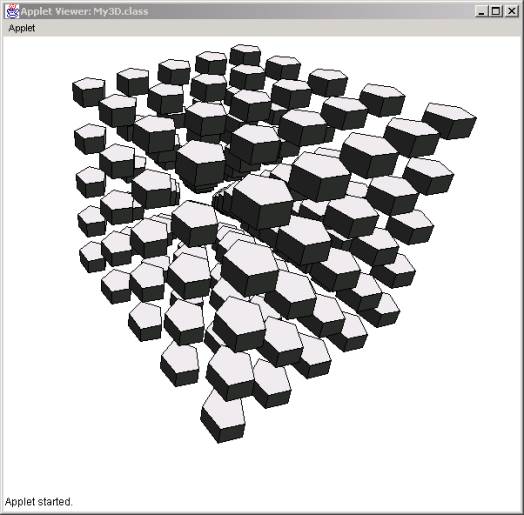
So far we have created a hierarchical structure of points, faces, and solids. The rationale was that solids contain faces, and faces contain points or, reversibly, points compose faces, and faces compose solids. With the same rational we can say that solids compose groups and groups contain solids. This simple hierarchy looks like:
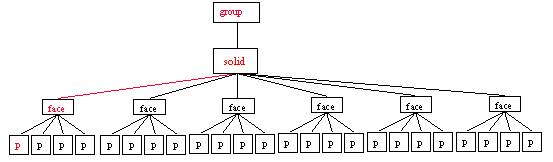
The implementation of this hierarchy will be as follows: we make a copy of MySolid and we change MyFace[] faces and int numFaces with MySolid[] solids and int numSolids. The code would look like:
import
java.awt.*;
public
class MyGroup {
MySolid[]
solids;
int
numSolids;
public MyGroup(MySolid[] inSolids){
numSolids = inSolids.length;
solids = new MySolid[numSolids];
for(int i=0; i<numSolids; i++)
solids[i] = new MySolid(inSolids[i].faces);
}
//******************
public void draw(Graphics g){
for(int i=0; i<numSolids; i++)
solids[i].draw(g);
}
//*************
public void setRotatex (double angle) {
for(int i=0; i<numSolids; i++)
solids[i].setRotatex(angle);
}
//*************
public void setRotatey (double angle) {
for(int i=0; i<numSolids; i++)
solids[i].setRotatey(angle);
}
//*************
public void setRotatez (double angle) {
for(int i=0; i<numSolids; i++)
solids[i].setRotatez(angle);
}
//*************
public void setScale(double xs, double ys, double zs){
for(int i=0; i<numSolids; i++)
solids[i].setScale(xs, ys, zs);
}
//*************
public void setMove(double xoff, double yoff, double zoff){
for(int i=0; i<numSolids; i++)
solids[i].setMove(xoff, yoff,
zoff);
}
}
The constructor of a solid uses an alternative constructor to construct a MySolid. Specifically, we use
for(int i=0; i<numSolids; i++)
solids[i] = new MySolid(inSolids[i].faces);
but in MySolid we only have a
public MySolid(MyPoint[] inPoints, double height){
So we need to create such a constructor, one that takes only faces as an argument:
public MySolid(MyFace[] inFaces) {
numFaces = inFaces.length;
faces = new MyFace[numFaces];
for(int i=0; i<inFaces.length; i++)
faces[i] = new MyFace(inFaces[i].points);
color = new Color(255, 0, 0);
}
Notice that the second constructor assumes that we provide a sequence of faces whereas the first constructor gets a set of points (base) and a height and then generates the solid through extrusion. Again, this constructor should be placed in the MySolid class as an alternative constructor.
Once the MyGroup class is created we then need to call it from the main method. This is done in the following way:
import
java.applet.*;
import
java.awt.*;
import
java.awt.image.*;
public
class My3D extends Applet{
MyPoint[] points;
MySolid[] solids;
MyGroup group;
int xf, yf;
Graphics offGraphics;
Image offImage;
//**********************
public void init(){
offImage = createImage(400, 400);
offGraphics = offImage.getGraphics();
MyFace face = new MyFace(5, 20., 50., 50.);
solids = new MySolid[5*5*5];
int knt = 0;
for(int xk = 0; xk<5; xk++)
for(int
yk = 0; yk<5; yk++)
for(int
zk = 0; zk<5; zk++){
points
= new MyPoint[face.numPoints];
for(int
i=0; i<points.length; i++)
points[i]
= new MyPoint(face.points[i].x,
face.points[i].y,
face.points[i].z);
solids[knt]
= new MySolid(points, 20.);
solids[knt].setMove(xk*60.,
yk*60., zk*60.);
knt++;
}
group = new MyGroup(solids);
group.setMove(-50., -50., -50.);
}
/**
*******************/
public void paint(Graphics g){
offGraphics.setColor(Color.white);
offGraphics.fillRect(0,0,400,
400);
group.draw(offGraphics);
g.drawImage(offImage, 0, 0, this);
}
//************************************************
public boolean mouseDown(Event e, int x,
int y){
xf = x;
yf = y;
return true;
}
//************************************************
public boolean mouseDrag(Event e, int x,
int y){
int xoff = x - xf;
int yoff = y - yf;
group.setRotatex(xoff*Math.PI/180);
group.setRotatey(yoff*Math.PI/180);
repaint();
xf = x;
yf = y;
return true;
}
}
In the init() method, we first create a face using the method
MyFace face = new MyFace(5, 20., 50., 50.);
This method is a new method in the MyFace class that constructs a face from the number of sides, radius, and the (x,y) center of the face. We used this face as a basis for extrusion.
The second step is to allocate memory for the solids:
solids = new MySolid[5*5*5];
(We are hard-coding the number of solids for simplicity here, but a better practice would be to define variables instead).
Finally, we loop three times in x, y, and z directions using three counters xk, yk, and zk. Inside the loop, we first create a set of points (points[]) which we populate with the points created through the face constructor earlier (see above). Once the set of points is populated, we create the MySolid and we move it in a 3D grid in space 60 units apart:
int knt =
0;
for(int
xk = 0; xk<5; xk++){
for(int yk = 0; yk<5; yk++){
for(int zk = 0; zk<5; zk++){
points = new MyPoint[face.numPoints];
for(int i=0;
i<points.length; i++)
points[i] = new
MyPoint(face.points[i].x,
face.points[i].y,
face.points[i].z);
solids[knt] = new
MySolid(points, 20.);
solids[knt].setMove(xk*60.,
yk*60., zk*60.);
knt++;
}
}
}
At the very end, we create the group from the newly created solids and we move the whole structure by 50 units in spac to see it:
group =
new MyGroup(solids);
group.setMove(-50., -50., -50.);
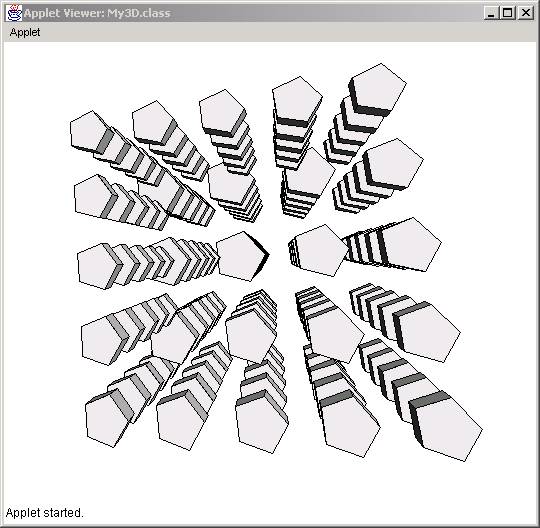
The result is:
Sorting Solids (Painter’s algorithm)
In the above display, we notice that some objects appear to be in front of others in the wrong direction. In the MyGroup class, when we display the solids we draw them in the order they we created:
//******************
public void draw(Graphics g){
for(int i=0; i<numSolids; i++)
solids[i].draw(g);
}
So, for example, the third solid that was created will always be painted when i is equal to 3 (see above) regardless of the orientation of the grid mass. But the correct way to draw the solids would be to sort them in distance from our eye and them paint them from the furthest to the closest (in reverse order). In that way, the closest object will painted last covering the ones further away. This algorith is also called “the painter’s algorithm”.
So we need to first sort the solids and then paint in reverse order.
The sorting algorithm looks as follows:
//******************
public void sort(){
double[] zc;
zc = new double[numSolids];
int knt;
double centerz;
// Calculate the centroids of each solid
for(int i=0; i<numSolids; i++){
centerz = 0;
knt = 0;
for(int j=0; j<solids[i].numFaces; j++){
for(int k=0; k<solids[i].faces[j].numPoints; k++){
centerz += solids[i].faces[j].points[k].z;
knt++;
}
}
zc[i] = centerz/knt;
}
// Sorting the objects
for(int i=0; i<numSolids; i++)
for(int j=0; j<numSolids; j++)
if(zc[i] > zc[j]){
MySolid tobj = solids[i];
solids[i] = solids[j];
solids[j] = tobj;
double temp = zc[i];
zc[i] = zc[j];
zc[j] = temp;
}
}
Sorting is done in two steps: a) we calculate the centroids of each solid and b) we sort them according to the centroids.
To calculate the centroids, we loop through all points or all faces of all solids and we get the average of the points which we then store in the array zc[].
To sort the solids we use two counters i and j that loop through all solids and we compare the zs[i] with the zc[j] values. If they are greater that one another we swap them and the solids associated with them:
if(zc[i] > zc[j]){
MySolid tobj = solids[i];
solids[i] = solids[j];
solids[j] = tobj;
double temp = zc[i];
zc[i] = zc[j];
zc[j] = temp;
}
When done we sort the faces and paint in reverse order, as shown in the paint() method below:
//******************
public void draw(Graphics g){
sort();
for(int i=0; i<numSolids; i++)
solids[numSolids-1-i].draw(g);
}
The result is: