File Input/Output (I/O)
In the previous chapters, (when we dealt with clouds of points) we saw how to read and write DXF files. There we were concerned only with the geometry of the points and not the connection of the faces. To accommodate the point-face-solid-group hierarchical structure, we need to do a few modifications of the previous code. In the next sections we will show how to write and read DXF and VRML files.
Write a DXF file
To write a DXF file we need to write the keywords “POLYLINE” and “SEQEND” to identify the beginning and end of a face. (Note: In the case of DXF face and solid are the same thing). The following code show how to write a DXF file:
/*********************************************************/
void
writeDXF(MyGroup group, String filename) throws IOException
{
System.out.println("Writing file
" + filename + "...");
FileOutputStream file = new
FileOutputStream(filename);
DataOutputStream stream = new
DataOutputStream(file);
try {
stream.writeBytes("999\r\n");
stream.writeBytes("Kostas\r\n");
// put some identification here
stream.writeBytes(" 0\r\n");
stream.writeBytes("SECTION\r\n");
stream.writeBytes(" 2\r\n");
stream.writeBytes("ENTITIES\r\n");
stream.writeBytes(" 0\r\n");
for(int k=0;
k<group.numSolids; k++){
//faces
for(int j=0;
j<group.solids[k].numFaces; j++) {
stream.writeBytes("POLYLINE\r\n");
stream.writeBytes(" 8\r\n");
stream.writeBytes("layer_1\r\n");
stream.writeBytes("
66\r\n");
stream.writeBytes(" 1\r\n");
stream.writeBytes("
70\r\n");
stream.writeBytes(" 9\r\n");
stream.writeBytes("
62\r\n");
stream.writeBytes(" 183\r\n");
stream.writeBytes(" 0\r\n");
//points
for(int i=0; i<group.solids[k].faces[j].numPoints; i++) {
stream.writeBytes("VERTEX\r\n");
stream.writeBytes("
8\r\n");
stream.writeBytes("layer_1\r\n");
stream.writeBytes("
62\r\n");
stream.writeBytes("183\r\n");
stream.writeBytes("10\r\n");
stream.writeBytes(Double.toString(
group.solids[k].faces[j].points[i].x)+"\r\n");
stream.writeBytes("
20\r\n");
stream.writeBytes(Double.toString(
group.solids[k].faces[j].points[i].y)+"\r\n");
stream.writeBytes("
30\r\n");
stream.writeBytes(Double.toString(
group.solids[k].faces[j].points[i].z)+"\r\n");
stream.writeBytes(" 70\r\n");
stream.writeBytes("
32\r\n");
stream.writeBytes("
0\r\n");
}
stream.writeBytes("SEQEND\r\n");
stream.writeBytes(" 0\r\n");
}
}
stream.writeBytes("ENDSEC\r\n");
stream.writeBytes(" 0\r\n");
stream.writeBytes("EOF\r\n");
//*** Finish
stream.flush();
stream.close();
}
catch(IOException e) {
System.err.println(e.toString() );
}
}
Read a DXF file
To read a DXF we do the same as in the Cloud section.
//********************************
public MyGroup readDXFFile(String fileIn)
throws IOException
{
Vector vpoints = new Vector();
Vector vfaces = new Vector();
System.out.println("Reading DXF file
" + fileIn + "...");
File is = new File(fileIn);
FileReader file = new FileReader(is);
StreamTokenizer st = new StreamTokenizer(file);
st.wordChars(' ','_');
boolean poly_flag = false;
boolean exit = false; //flag to exit
double x = 0.;
double y = 0.;
double z = 0.;
while (true) {
if(exit) break;
st.nextToken();
switch (st.ttype) {
case StreamTokenizer.TT_EOF:
exit = true;
break;
case StreamTokenizer.TT_WORD:
if("POLYLINE".equals(st.sval))poly_flag = true;
if("SEQEND".equals(st.sval)){
poly_flag = false;
int numPoints = vpoints.size();
MyPoint[] points = new MyPoint[numPoints];
for(int i=0; i<numPoints; i++)
points[i] =
(MyPoint)vpoints.elementAt(numPoints-1-i);
vfaces.addElement(new MyFace(points));
vpoints.removeAllElements();
}
break;
case StreamTokenizer.TT_NUMBER:
if (poly_flag==true && st.nval == 10){
if (st.nextToken() ==
StreamTokenizer.TT_NUMBER)
x = st.nval;
if (st.nextToken() ==
StreamTokenizer.TT_NUMBER)
if (st.nextToken() ==
StreamTokenizer.TT_NUMBER)
y = st.nval;
if (st.nextToken() ==
StreamTokenizer.TT_NUMBER)
if
(st.nextToken() == StreamTokenizer.TT_NUMBER)
z = st.nval;
vpoints.addElement(new
MyPoint(x, y, z));
}
break;
default:
break;
} /* switch */
}
/* while */
System.out.println("Finished ");
int numFaces = vfaces.size();
MyFace[] faces = new MyFace[numFaces];
for(int i=0; i<numFaces; i++)
faces[i] =
(MyFace)vfaces.elementAt(i);
MySolid[] solids = new MySolid[numFaces];
for(int i=0; i<numFaces; i++){
MyFace[] aFace = new MyFace[1];
aFace[0] = new
MyFace(faces[i].points);
solids[i] = new MySolid(aFace);
}
MyGroup group = new MyGroup(solids);
group.setScale(.3, .3, .3);
file.close();
return group;
}
Read VRML Files
Suppose that we create two cubes in formZ (or any other modeling program).
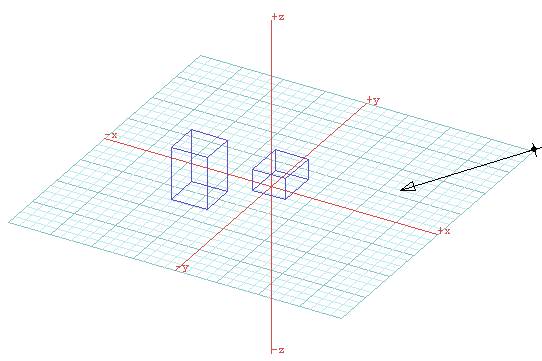
Lets save the files in a VRML format and call it 2cubes.wrl. If open the file in a text editor (i.e. notepad), we will see that the file is text and that it is structured in a special way. The syntax on the information in the file follows the specifications of VRML 2.0, which is documented at http://www.sdsc.edu/vrml or in the book “VRML Sourcebook” by A. Ames, D. Nadeau, and J. Moreland, Wiley and Sons, 1997.
#VRML
V1.0 ascii
#Creator
formZ v 3.6.0
#Date
03/07/01 21:34:08
#User
UCLA:Kostas Terzidis:Z-0200-0046276
DEF
Cameras Switch {
whichChild 0
DEF activeview OrthographicCamera {
position -13.8875 16.0359 -24.0538
orientation 0.0691842 0.963611
0.258199 -2.63623
focalDistance 5
height 37.0333
}
}
DEF
Color_1 Material {
ambientColor 0.5 0.5 0.5
diffuseColor 0.381476 0.30518 0.762951
transparency 0
}
DEF
light_1 DirectionalLight {
on TRUE
intensity 1
color 1 1 1
direction 0.762853 -0.560921 0.321595
}
DEF
object_1 Separator {
Coordinate3 {
point [
3.77694 0 -1.53537,
1.65063 0 -1.53537,
1.65063 0 -3.59264,
3.77694 0 -3.59264,
3.77694 3.04801 -1.53537,
1.65063 3.04801 -1.53537,
1.65063 3.04801 -3.59264,
3.77694 3.04801 -3.59264,
]
}
USE Color_1
IndexedFaceSet {
coordIndex [
0, 3, 2, 1, -1,
4, 5, 6, 7, -1,
0, 1, 5, 4, -1,
1, 2, 6, 5, -1,
2, 3, 7, 6, -1,
3, 0, 4, 7, -1,
]
}
}
DEF
object_2 Separator {
Coordinate3 {
point [
0.640228 0 1.56611,
-1.27292 0 1.56611,
-1.27292 0 -0.731554,
0.640228 0 -0.731554,
0.640228 1.2192 1.56611,
-1.27292 1.2192 1.56611,
-1.27292 1.2192 -0.731554,
0.640228 1.2192 -0.731554,
]
}
USE Color_1
IndexedFaceSet {
coordIndex [
0, 3, 2, 1, -1,
4, 5, 6, 7, -1,
0, 1, 5, 4, -1,
1, 2, 6, 5, -1,
2, 3, 7, 6, -1,
3, 0, 4, 7, -1,
]
}
}
As we can see, geometry-wise the syntax makes a distinction between the two objects (they are called object_1 and object_2). We can also see the coordinates of all points and the connections of the points. For example the line
0, 3, 2, 1, -1,
means start at point index 0 then go (or draw) to 3, then go to 2, then go to 1, and end when you encounter a –1. So to read the geometry of an object we need to collect the x,y,z coordinates and then connect them in the given order. We can use the keywords coords and coordIndex to find the beginning and end of these sections. The following code shows one way of reading a VRML file (just the geometry):
//********************************
public MyGroup
readVRMLFile(String fileIn) throws IOException
{
Vector vpoints = new
Vector();
Vector vfaces = new
Vector();
Vector vpointsindex =
new Vector();
System.out.println("Reading DXF file " + fileIn +
"...");
File is = new
File(fileIn);
FileReader file = new
FileReader(is);
StreamTokenizer st =
new StreamTokenizer(file);
boolean exit =
false; //flag to exit
boolean coord_flag =
false;
boolean
coordindex_flag = false;
double[] coord;
coord = new double[3];
int knt = 0;
while (true) {
if(exit) break;
st.nextToken();
switch (st.ttype) {
case
StreamTokenizer.TT_EOF:
exit = true;
break;
case
StreamTokenizer.TT_WORD:
if("coord".equals(st.sval)) {
coord_flag=true;
coordindex_flag = false;
vpoints.removeAllElements();
}
if("coordIndex".equals(st.sval))
{
coord_flag=false; coordindex_flag = true;
vpointsindex.removeAllElements();
}
break;
case
StreamTokenizer.TT_NUMBER:
if
(coord_flag==true){
coord[knt] = st.nval;
knt++;
if(knt==3){
knt = 0;
vpoints.addElement(new MyPoint(
coord[0]*20, coord[1]*20, coord[2]*20));
}
}
if (coordindex_flag==true){
if(st.nval
!= -1)
vpointsindex.addElement(new
Integer((int)st.nval));
else{
int
numPoints = vpointsindex.size();
MyPoint[]
points = new MyPoint[numPoints];
for(int
i=0; i<numPoints; i++){
Integer
index = (Integer)vpointsindex.elementAt(i);
points[i]
= (MyPoint)vpoints.elementAt(index.intValue());
}
vfaces.addElement(new MyFace(points));
}
}
break;
default:
break;
}
/* switch */
} /* while */
System.out.println("Finished ");
int numFaces =
vfaces.size();
MyFace[] faces = new
MyFace[numFaces];
for(int i=0;
i<numFaces; i++)
faces[i] =
(MyFace)vfaces.elementAt(i);
MySolid[] solids = new
MySolid[numFaces];
for(int i=0;
i<numFaces; i++){
MyFace[] aFace =
new MyFace[1];
aFace[0] = new
MyFace(faces[i].points);
solids[i] = new
MySolid(aFace);
}
MyGroup group = new
MyGroup(solids);
file.close();
return group;
}
The rationale in this code is simple: we tokenize the file and we look for keywords. If the word coords is found we set a flag (coord_flag). If the word coordIndex is found we set a flag (coordindes_flag). According to when the flags are set we know that the incoming information will be coordinate triads or connection sets. If coordinates are encountered, we store them in a Vector (vpoints). If connections are encountered, we store them in a Vector (vpointsindex). Once we are done with an object we create the appropriate arrays and populate them with the information contained in the twoVectors.