17.
Defining a new class called MyPoint
So far we have dealt with one-file classes, that is, classes that reside on one single file with the same name. But if later we start adding more and more methods in the file, the file may become huge and inefficient to search, run, or organize. We break therefore the methods into files and inside each file we write the code for organized sets of variables and methods called classes. In that way we break the program in files each of which contains information blocks.
First, we will create a new file called MyPoint.java and inside that file, we will define a new class called MyPoint. This new class will be used to store information about points and their related methods (such move, rotate, scale, etc). Here is the new class:
public class MyPoint {
int x, y; //members
public MyPoint(int xin, int yin){ //constructor
x = xin;
y = yin;
}
}
The class is called MyPoint and is public (so it can be used by other classes). It is composed of two sections: the members and the constructor.
- In the members area we put all the variables that are associated with the class. In this case, since it is a point we are talking about the members of a point should logically be its coordinates, which we will call x and y.
- The second section is the constructor. In that area we assign values to the members. So in this case, to construct MyPoint we need to pass two variables xin and yin (or two numbers) that are then assigned to the members x and y.
This new class we save as MyPoint.java and we add it to the project.
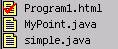
To use the newly defined class we need to call it from the main area of simple.java. Here is how we call it:
import java.applet.*;
public class simple extends Applet{
//*****************************************
public void init(){
MyPoint p = new
MyPoint(100, 200);
System.out.println(" x = " + p.x + " y =
" + p.y);
}
}
The statement
MyPoint p = new MyPoint(100, 200);
says that we are a) we are declaring a new object p of type MyPoint and b) we are allocating memory (that is the “new” word) to create a new MyPoint to which we pass 100 and 200 as the x and y coordinates. After this the program goes to the MyPoint.java file and looks for the constructor. When it sees the constructor:
public MyPoint(int xin, int yin){ //constructor
x = xin;
y = yin;
}
xin is 100 and yin is 200 and therefore x member is 100 and y member is 200. Now when we want to printout the members of MyPoint in the statement:
System.out.println(" x = " + p.x + " y = " + p.y);
We get access to x and y of object p by using the “.” Operator that simply says “go to object p and give me the member x”, that is, p.x.
17.1
Adding methods to a class
Now the reason why we created a MyPoint object was to facilitate operations on points by organizing and concentrating them in the class’s area. Suppose that we introduce randomness in the MyPoint class. We then need to assign random coordinates to the members x and y. Therefore we create a method, which we will call randomize and this will do the job of randomness (given a range).
public class MyPoint {
int x, y; // members of
class
//********** Constructor
public MyPoint(int xin, int yin){
x = xin;
y = yin;
}
//********** Method
public void randomize(int range){
x = (int)(range * Math.random());
y = (int)(range * Math.random());
}
}
The method randomize (which is public) takes one argument, the integer range. Then it creates two random numbers which it assigns to members x and y of the MyPoint class. This method is invoked (or called) from the main code through the following statements:
import java.applet.*;
public class simple
extends Applet{
//*****************************************
public void init(){
MyPoint p = new MyPoint(100, 200);
System.out.println(" x = " + p.x + " y =
" + p.y);
p.randomize(10);
System.out.println(" x = " + p.x + " y =
" + p.y);
}
}
With the statement p.randomize we call the method randomize that assigns new values to x and y within the MyPoint class. So x and y are now different. We then printout x and y and the output result is:
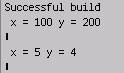
The first printout was the predictable 100 and 200 that we assigned and the second printout was two random numbers between 0 and 10, which are 5 and 4.
Notice that in the MyPoint class the method randomize takes as a return value “void”, which means that randomize does not return anything directly. Instead, it does its job by changing the values of x and y which are then accessed indirectly through the calls p.x and p.y. Another thing worth mentioning is that the constructor MyPoint does not take “void” because it is not a method. The syntax of a constructor is to simply define it with the same name as the class (and the file) without any identifiers (except public).